
Alternative to Notion: A Task First Workspace Review
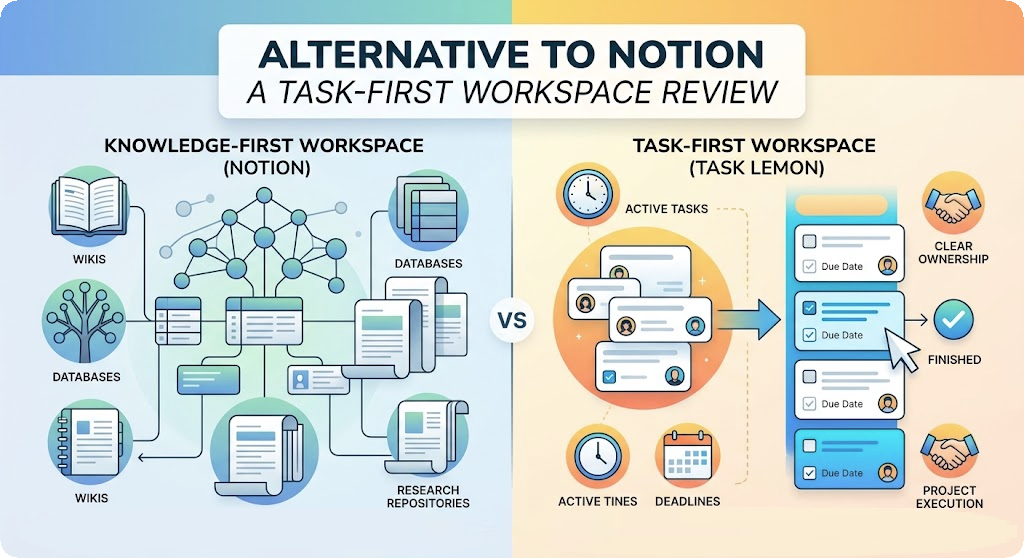
Is your team spending more time maintaining your Notion workspace than actually getting work done? While Notion remains a powerhouse for company wikis, its endless customization can create unnecessary friction for daily task management. Discover why task first alternatives like Task Lemon might be the solution for teams needing clearer project visibility and less administrative upkeep.
TL;DR
Struggling with Notion's high maintenance and buried to-do lists? The choice comes down to needing a customizable knowledge base or a dedicated task execution tool. Task Lemon offers low setup & keeps context attached to active work, while Notion is best for highly tailored information systems.
A productivity workspace can hold every note, task, plan, and conversation a team creates, yet still make daily work harder to find. That problem explains the growing search for an Alternative to Notion, especially among people whose once-useful workspaces now require constant maintenance.
Former Notion users often want faster task workflows, clearer ownership, easier collaboration, and task management that supports reliable completion. They may also want pricing that stays predictable as their teams change. Task Lemon is one option for people seeking a better Notion replacement. The larger question is whether it makes active work easier to organize and finish.
Key Takeaways
Notion remains a strong choice for wikis, documentation, research repositories, and flexible databases, but its customization can make daily task management harder to maintain.
Task Lemon takes a task-first approach with clear ownership, due dates, project views, comments, files, reminders, and communication connected to active work.
The best Notion alternative depends on the team's primary need: documentation, connected information, personal notes, or reliable project execution.
Before switching, audit active tasks and projects, compare plan limits and collaboration needs, and migrate only the information that supports current work.
Task Lemon may be a better fit for teams that want clearer task visibility and less workspace maintenance, while Notion may still be better for mature knowledge systems and custom information structures.
A Workspace Alternative Should Solve Daily Work
Notion's appeal is clear. It lets teams build pages, databases, wikis, project trackers, and custom systems in one place. Its strength is knowledge management, the organization of documentation, decisions, reference material, and linked information. However, that goal differs from daily execution, where task visibility and clear ownership matter most.
A replacement should improve the parts of work that happen every day. That includes capturing tasks, assigning owners, setting deadlines, tracking projects, storing useful context, and finding decisions without hunting through old pages.
Teams can also compare workspaces by their primary use case. Documentation-first tools such as Slite focus on shared knowledge, while Slite can suit teams that want a simpler place for policies and decisions. Coda offers flexible pages and databases, and Coda can support custom information systems when teams are willing to maintain them. Anytype and AFFiNE may appeal to people who value connected information or portable work. Obsidian is often associated with personal notes, Markdown files, and a Graph view. ClickUp takes a more task-centered approach, while ClickUp can give project teams clearer execution views. These categories aren't interchangeable, so the right choice depends on whether the priority is documentation, connected information, or getting assigned work finished.
The most common weaknesses people experience with Notion
Notion's database model gives teams unusual freedom. A content calendar can become a project tracker, a hiring system, or a client record. Its database visualization can be useful, but that freedom also asks someone to decide how each system should work before the work itself can begin.
Different teammates may create different page structures, properties, and naming habits. Over time, task details can sit in one database, meeting notes in another page, and project status in a third location. The result isn't a flaw in Notion's design. It is a tradeoff of a tool built for customization.
Notion remains strong for company wikis, research repositories, documentation, and connected databases. Teams that need a highly tailored information system may still find those strengths outweigh the upkeep. An object based model can connect related information well, but it may require more setup than a straightforward task view.
Project management requires consistent ownership, deadlines, and status visibility, not merely a place to store project information. Note taking can solve personal capture, while Document collaboration matters when teams edit shared notes, policies, and working guidelines.
Some teams also evaluate tools based on control and portability. Open source options may offer a different relationship with the software, while a Local first approach can affect where information is stored and how it remains available. These qualities vary by product, so they shouldn't be treated as identical promises.
Artificial intelligence may reduce maintenance when it helps summarize discussions, find information, or turn a request into a task. Offline mode can also matter for teams that need access during unreliable connectivity. Custom workflows are valuable only when they don't create ongoing administrative work.
The features that matter when switching workspaces
Feature counts rarely reveal whether a workspace will reduce friction. A better test follows the path of an ordinary assignment: someone captures it, an owner sees it, the team can discuss it, and its progress remains visible until completion.
A serious replacement should support:
Clear task capture, ownership, due dates, recurring work, and priority.
Project views that show workload without forcing teams to build their own database logic.
Notes and files kept near the work they inform.
Search, access controls, integrations, and migration options that fit existing habits.
A learning curve that allows new teammates to contribute without studying a private internal manual.
A workspace becomes difficult when its structure takes more attention than the work recorded inside it.
Task Lemon vs. Notion: Features, Workflow, and Everyday Usability
Task Lemon and Notion begin from different assumptions. Project management is execution-focused in Task Lemon, while Notion starts with flexible pages and databases. Notion's product features include tools for documents, wikis, projects, and customizable information management.
Coda and Slite also appeal to teams building adaptable documentation systems. Anytype suits people who want connected information, while ClickUp takes a more dedicated execution approach.
Task Lemon centers the work itself. Its task and project management features include task assignment, priorities, lists, boards, calendars, comments, file sharing, real-time updates, reminders, scheduling, and team chat. It also offers CoreHubs for managing multiple projects.
Notion Pricing Plans
Notion charges per seat (per user), meaning your costs will scale directly with the size of your team.
Plan | Pricing | Key Features & Limits |
Free | $0 | Unlimited pages and blocks for solo users. Up to 10 guests and a 7-day page history. |
Plus | $10 per user/month (billed annually) or ~$12 monthly | Unlimited blocks for teams and unlimited file uploads. Unlimited guests and 30-day page history. |
Business | $20 per user/month (billed annually) or ~$24 monthly | Includes full Notion AI and 90-day page history. Offers better collaboration features for building complex databases. |
Enterprise | Custom pricing | Unlimited page history. Includes full Notion AI with zero data retention. |
Task Lemon Pricing Plans (Smart Access)
Task Lemon uses flat-rate monthly pricing based on capacity and features, rather than charging per individual user.
Plan | Pricing | Key Features & Limits |
Solopreneur | $0/month | Supports 1 team with up to 2 team members and 1 active project. Includes 0.5 GB of storage and default task/project statuses, Project Calendar, & Team's Chat |
Startup | $50/month (or $500/year) | Supports up to 7 team members across 5 projects. Includes 100 GB of storage and allows up to 25 custom task and project statuses, Documentation, Project Calendar, Team's Chat, & Ai |
Established | $150/month (or $1500/year) | Supports up to 25 team members across 25 projects. Includes 1 TB of storage and offers unlimited teams and custom statuses, Documentation, Project Calendar, Team's Chat, & Ai |
Why Task Lemon may be easier for task-focused teams
A task-first system gives each item an owner, status, and place in a project from the start. That structure helps a freelance consultant, small business, or product team stay organized.
Explicit task management can be easier to maintain than a custom database. Team collaboration stays close to the assignment through comments, updates, and shared visibility. ClickUp and Asana offer a similar execution emphasis, while Coda and Slite lean more toward flexible workspaces and documentation.
In Notion, a team can build those same patterns, but it must first create the database, properties, views, and rules. Some teams enjoy that control. Others find that task management becomes a design project with no clear stopping point.
Task Lemon's lists, boards, and calendar views keep discussions close to each assignment. ClickUp may suit teams wanting extensive execution tools, but Task Lemon keeps the workflow more direct.
Which tool handles notes, documents, and project context better?
Notion is often the better fit when information itself is the central product. Its knowledge management approach can suit editorial archives, operations policies, and detailed internal wikis.
Coda and Slite work well for teams that prioritize structured documentation. Anytype and Obsidian appeal to people who prefer connected notes or personal knowledge systems. Readers who prioritize Local first principles may also value local control or offline access, depending on the tool they choose.
Task Lemon is more suited to teams that need context attached to active work. Project documentation, files, comments, and updates can remain connected to the task or project where they matter. ClickUp can support project execution, while Coda adds flexible information structures.
Note taking can remain separate from team-owned work when personal capture is the main need. Slite and Coda may be stronger for shared documents, while Task Lemon keeps active assignments and project context together.
For people leaving Notion because tasks disappear inside documentation, the more focused model can be easier to maintain.
Task Lemon and Notion Pricing Compared
Pricing deserves more scrutiny than the lowest monthly figure. Evaluate each plan against the team's actual project management workload, not just its monthly cost. A free plan may suit personal work but restrict projects, storage, status customization, reporting, access controls, or the number of people who can participate.
Task Lemon's Smart Access plan details list tiered limits for team members, projects, Cloud storage, teams, and custom task and project statuses. The published comparison includes a one-project entry tier, then higher levels with up to five and 25 projects, plus broader storage and team capacity. Verify current project, user, permission, reporting, and support limits before migrating.
Plan fit also varies across competing tools. Slite often suits teams prioritizing lightweight documents, while Coda combines documents with databases. ClickUp usually emphasizes project capacity and task execution. Compare Slite's free-tier limits with Coda's document and database allowances, then review ClickUp's seat-based structure and project limits. Before choosing, check how Slite handles collaborators, how Coda scales shared workspaces, and whether ClickUp includes the capacity your active projects require.
Where Task Lemon offers stronger value
The cost of a workspace includes time spent configuring it. A low subscription price loses its appeal when a manager must build every tracker, maintain custom workflows, teach every convention, and repair pages after each process change.
Task Lemon can offer stronger value when a team needs defined task ownership, project visibility, communication in context, and a limited set of working views. Compared with Anytype's knowledge-oriented approach or Asana's task-centered plans, it may better match teams that need focused execution without extensive configuration.
A small team should distinguish between access for occasional collaborators and the capacity needed for active projects. Larger organizations should also assess backups, reporting, custom statuses, permissions, workflow automation, data privacy, retention, support, and Enterprise features before treating a base plan as a complete estimate.
When Notion may still be the better fit
Notion may cost less in practical terms for a team that already has a well-run workspace and uses it mainly for documents, wikis, content planning, or linked records. Rebuilding a mature knowledge system elsewhere carries a real labor cost.
Its paid plans can also make sense when the organization needs Notion's broad page-and-database flexibility more than dedicated task structure. The relevant comparison is not which platform has more options. It is whether those options match the work that fills the workspace each week.
Why Task Lemon Can Be a Better Choice for People Leaving Notion
Task Lemon is a better choice under a clear set of conditions. The team needs visible task ownership, upcoming deadlines, project status, and in-context conversations.
That need is common among people who use Notion primarily to organize daily work. They may have started with a lightweight board, then added linked databases, templates, status properties, and separate reference pages. Over time, routine work becomes harder to inspect.
A practical checklist for deciding whether to switch
A decision should rest on current behavior rather than promises on a pricing page. These questions can reveal whether the existing system has become a burden:
How much time does the team spend building, updating, or explaining pages?
Are deadlines missed because tasks are buried in notes or disconnected databases?
Can a new teammate understand project status without a live walkthrough?
Does every project use the same basic rules for owners, statuses, and priorities?
Does the current plan match actual project volume and collaboration needs?
If several answers point to confusion, a task-centered product deserves a closer look. If the answers point to effective documentation and stable systems, the case for moving is weaker.
How to move from Notion without losing important work
Software migration should begin with an audit, not a bulk export. Separate active tasks, current projects, reference material, archived material, and pages nobody has opened in months. Only the first three categories usually need immediate attention.
For teams with strict data-location requirements, decide whether to take a Local first approach before transferring active information. The right destination depends on what the material needs to do. Slite can suit focused documentation, while Coda offers a more database-oriented model. Anytype is another example for connected notes, and ClickUp represents a more execution-focused destination.
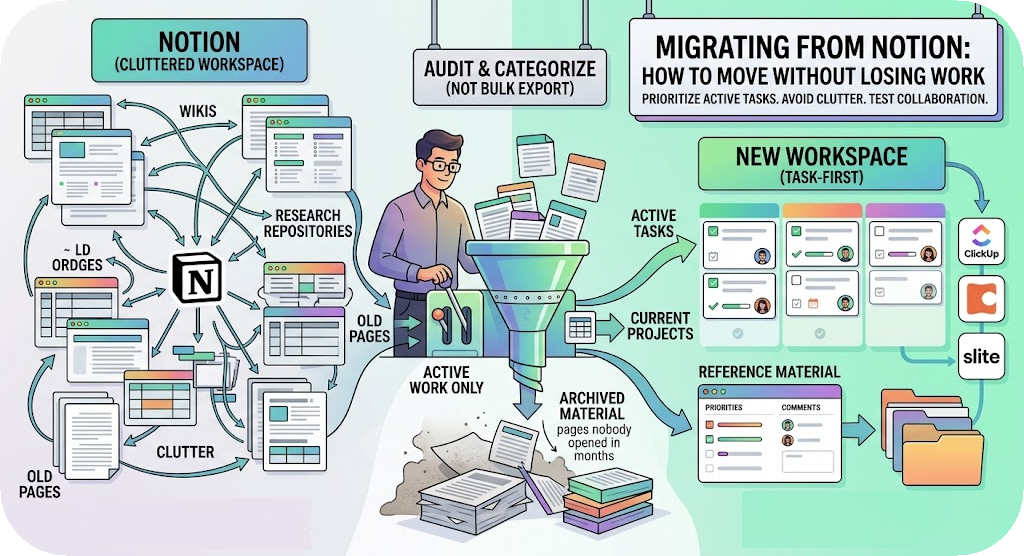
Next, recreate active work with a small number of useful statuses and views. Transfer owners, due dates, files, and decisions that affect open work. A pilot with task owners, reviewers, and view-only stakeholders can test Team collaboration and permissions. It can also show whether Slite, Coda, or ClickUp handles the shared status view clearly.
A short overlap between systems can protect work during the change. However, copying every abandoned page recreates the same clutter that prompted the switch. Compare the cleaned result with ClickUp or other possible destinations only after the active information is clear.
Frequently Asked Questions
Is Task Lemon a full replacement for Notion?
Task Lemon can replace Notion for teams that use it mainly for tasks, projects, deadlines, and collaboration. It’s less likely to replace a deeply developed wiki or a large network of custom databases without changing how information is stored.
What is better than Notion for project management?
A dedicated task-centered product may be better when teams need clear assignments, live status visibility, reminders, and conversations attached to work. Slite favors documentation and connected notes, while Coda and Anytype offer flexible information management; ClickUp focuses more directly on task execution. Slite can suit teams balancing notes with action, and ClickUp can suit teams that prioritize structured delivery.
Can Task Lemon support multiple projects?
Task Lemon's published Smart Access comparison includes plan limits for one, five, and 25 projects, depending on the tier. Teams should check plan details before migrating because project capacity is only one part of the decision.
Will switching tools solve missed deadlines?
Artificial intelligence may help capture tasks or summarize updates, but it can’t replace clear ownership and priorities. Strong Task management, visible owners, due dates, reminders, and shared project views can keep work from sitting unnoticed inside general notes.
Is Notion still good for small teams?
Notion remains useful for small teams that value flexible pages, internal documentation, and custom databases. Teams that need Offline mode should verify each tool’s access options before choosing, especially when connectivity is unreliable.
The Better Workspace Makes Work Easier to Finish
Notion's greatest strength is flexibility. That strength remains valuable when a team needs a rich knowledge base or a custom information system built around its own processes.
Task Lemon may be the stronger Alternative to Notion for people who want task ownership, project visibility, and clearer communication with less workspace maintenance. Slite, Coda, Anytype, and ClickUp may suit different documentation, connected information, or project execution needs, but Task Lemon keeps the focus on manageable work. The strongest replacement is not the platform with the longest feature list. It is the one that makes important work easier to see, organize, and finish.
Key Takeaways
- Identify your core need: Notion excels at flexible databases, while Task Lemon is built for reliable task completion. Other tools fit different niches: Slite and Coda for structured documents, Anytype for connected notes, and ClickUp for heavy project capacity.
- Beware of configuration fatigue: Notion's open-ended design means managing the workspace can become a project itself. Task Lemon offers clear ownership, statuses, and connected communication without the design overhead.
- Look beyond the price tag: Evaluate subscription plans against your team's actual workload. Pay close attention to tier restrictions on active projects, cloud storage, custom statuses, and team members.
- Migrate smartly, not completely: If you decide to switch, do not perform a bulk export. Audit your workspace and only transfer active tasks, current projects, and vital reference materials to avoid bringing old clutter into a new system.

Uzair
Content author at Task Lemon
Related Articles

Best Task Management Apps for 2026: A Practical Comparison
This guide compares personal and team oriented task management software for developers and growing teams. Review AI features, pricing, free access, and workflow fit before choosing your next task platform.
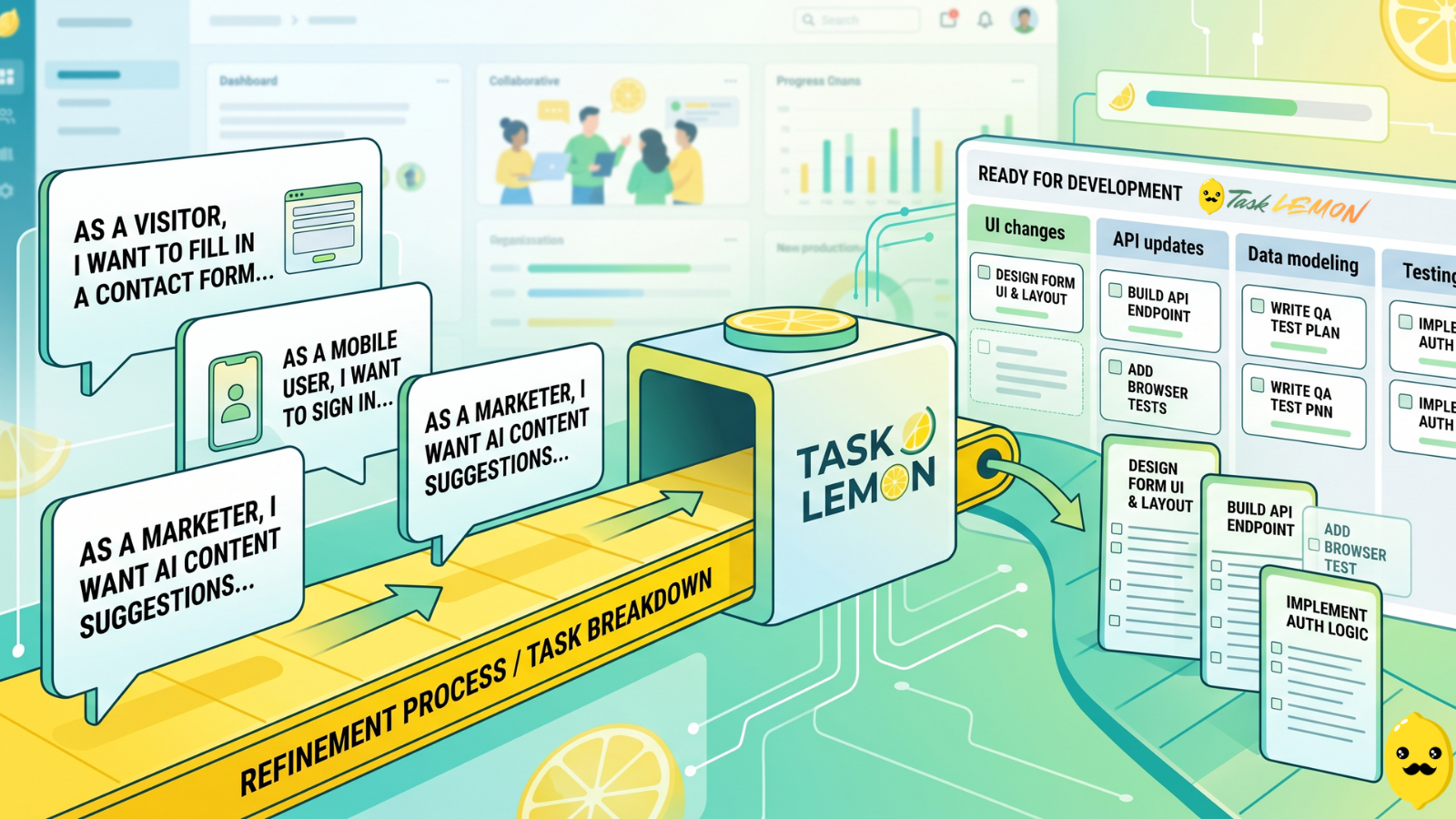
How To Turn User Stories Into Actionable Tasks In Task Lemon
Whether you are a freelancer, an agency, or a cross-functional product team, this guide shows you a repeatable, jargon-free way to take any user story and turn it into real, trackable tasks. Read on to discover how to set up your workflow, slice work vertically, and move your next big idea from the backlog to a shipped feature.

Mastering Project Management for Dev Teams: Collaboration, Fewer Mistakes, Higher Productivity
Learn how to build a lightweight project blueprint, break features into clear, manageable tasks, and adopt short development cycles to keep your team aligned. Plus, discover how using simple tools like Task Lemon can help you visualize progress, catch bugs early, and boost real productivity.