
How To Turn User Stories Into Actionable Tasks In Task Lemon
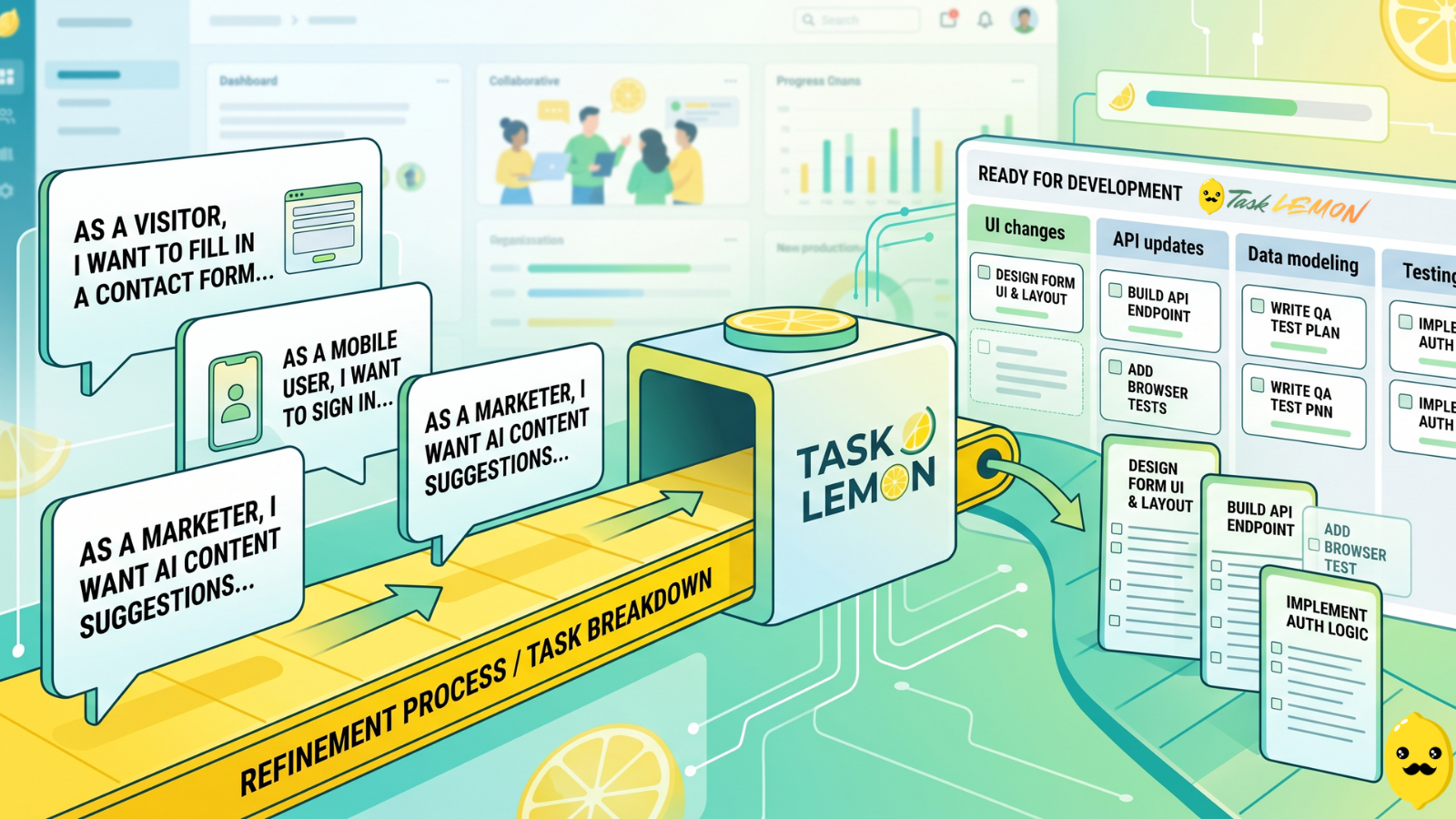
Whether you are a freelancer, an agency, or a cross-functional product team, this guide shows you a repeatable, jargon-free way to take any user story and turn it into real, trackable tasks. Read on to discover how to set up your workflow, slice work vertically, and move your next big idea from the backlog to a shipped feature.
TL;DR
Clarify the story: Hold a grooming session to align product, dev, and QA on the customer perspective and requirements. Create concrete tasks: Translate those work areas into plain-language tasks with clear outcomes.
You probably already write stories. You might even have a tidy backlog.
Yet without an agile framework, work still stalls, tickets float around, and features for web, mobile, or AI ship late.
The gap is simple. Stories describe how to deliver value, not actual work. Without a clear breakdown into tasks, your board fills with big cards that no one really starts or finishes.
Task Lemon gives you a flexible task and project management setup with boards, fields, Status, and subtasks. It fits freelancers, agencies, startups, and software teams in product development that ship websites, apps, or internal tools. This guide shows you a repeatable way to take any story and turn it into real, trackable tasks inside Task Lemon, without heavy agile jargon.
You will see how to set up Task Lemon, split stories, keep tasks small, and move work from idea to shipped feature.
Understanding User Stories In Your Product Workflow
User stories are already part of your process. The challenge is turning them into concrete action inside a tool like Task Lemon.
In a healthy setup for Agile teams, stories live at a higher level, then spawn smaller tasks your team can pick up and finish in one to two days. Task Lemon becomes the place where this whole flow lives, from initial story card to final "Done" status.
What A User Story Is (And Is Not)
The classic user story format follows this pattern:
As a [role], I want [goal], so that [benefit].
For example:
• Web: As a visitor, I want to fill in a contact form so that I can request a quote.
• Mobile: As a user, I want to sign in with email so that I can see my saved data.
• AI: As a marketer, I want content suggestions so that I can write posts faster.
The story captures the customer perspective, explaining who benefits and why. It is not:
• A full spec.
• A technical plan.
• A checklist of steps.
Work items are different. A work item is a concrete unit of work, like "Implement email sign-in API call" or "Add browser tests for contact form." A person can finish a work item in a short time and mark it complete.
Why User Stories Alone Don’t Drive Delivery
A clean story still leaves questions. What screens need updates? Which API needs changes? Who tests what? Without answers, cards sit in your backlog. Work starts, pauses, then restarts when someone asks for more detail.
You see telltale signs:
• Stories that live in "In progress" for weeks.
• Rework because acceptance criteria were missing.
• Spreadsheets, DMs, and comments scattered across tools; without strong collaboration and communication, there is no clear next step.
The problem is not the story format. The problem is the missing bridge from intention to action.
How Task Lemon Supports Story-Driven Work
Task Lemon gives you that bridge. You capture each user story as a card on a board. Then you:
• Refine the story with fields, descriptions, and attachments.
• Add sub-tasks or child cards for each chunk of work.
• Use statuses to move items across columns like Backlog, In progress, In review, Done.
• Use dependencies so tasks that wait on others are clearly marked.
• Use templates so every story includes role, goal, benefit, and acceptance-criteria.
Because Task Lemon also has chat comments, file sharing, and progress views, you keep the whole story-to-task flow in one place, not scattered across random tools.
Core Principles For Turning User Stories Into Actionable Tasks
Before you touch a board, you need a few simple core rules for Breaking Down User Stories into concrete items. These fit within a larger Agile Framework and work in any tool, but Task Lemon makes them easier to follow.
Principle 1: Start From Outcomes, Not Activities
Every task should point to a clear outcome a user or reviewer can see, directly tied to the goal to Deliver Value.
Instead of "Update backend code," write "Save lead form submissions to database and send email to sales inbox." Both involve coding, but only one tells you what success looks like.
In Task Lemon, link each task back to the user story. Use the description to restate the goal and benefit in one line, so the outcome is front and center.
Principle 2: Keep Tasks Small And Independent
Aim for tasks that take about one to two days of focused work, aligning with the INVEST Principle. Longer than that, and progress stalls. Shorter than a couple of hours, and your board fills with noise.
For a large story, split work like this into small, independent Technical Tasks:
• "Design lead form layout."
• "Build form UI and validation."
• "Implement API call to store leads."
• "Send notification email from backend."
• "Add analytics events for form submit."
Each task can move across the Task Lemon board on its own. Code review and QA go faster, and you get more chances to spot blockers early.
Principle 3: Add Acceptance Criteria Before You Create Tasks
Good criteria describe what must be true for the story to count as done. They are:
• Testable.
• Clear.
• Tied to user value.
Example for a login story:
• User can log in with valid email and password.
• Error message appears for wrong password.
• Password field hides input.
• User stays signed in for 30 days unless they log out.
In Task Lemon, you can add these to the story Description section. Then you turn each into test steps for dev and QA tasks. Product Owner, dev, and test all agree on these checks before work starts.
Principle 4: Slice Work Vertically Across The Stack
A "vertical slice" cuts through UI, backend, and data for one user outcome.
Instead of separate long tasks like "Frontend for AI suggestion feature" and "Backend for AI suggestion feature," start with one end-to-end path, for example:
• "User can request one suggestion and see it in the UI."
Inside Task Lemon, you add sub-tasks under that story: UI changes, API call, prompt design, logging, and tests. Once this vertical slice works, you add more slices, such as multiple suggestions or advanced filters.
Principle 5: Make Ownership And Dependencies Obvious
Every task needs one clear owner. Even if more than one person works on it, one person drives it forward.
Use Task Lemon assignees to show ownership. Use dependencies and labels like "Blocked" so the team sees where work is stuck. Order tasks in each column so the next priority is always clear.
Preparing Task Lemon For Story-To-Task Workflows
A light setup in Task Lemon is enough to create a Workflow and Process for keeping stories and tasks in sync.
Set Up A Product-Friendly Workspace
Create a workspace, then make boards by product, client, or big initiative. For each board, use columns such as:
• Backlog
• Product Backlog Refinement
• Ready for development
• In progress
• In review or testing
• Done
This simple layout works for a solo freelancer and a cross-functional team. At a glance, you see which stories are ready, which are in play, and which are complete.
Configure Fields That Support Smart Task Breakdown
Start lean. Use a small set of fields that actually guide work:
• Priority
• Due date
• Status
• Assignee
• Task type (feature, bug, tech debt, spike)
• Linked story or epic
In Task Lemon, use custom status fields to match your terms. Avoid adding lots of status that nobody updates. The goal is quick, clear decisions, not admin work.
Create A Reusable User Story Template In Task Lemon
Build a story template so every new user story has the same structure:
• Role, goal, benefit line, informed by User Personas.
• Acceptance-criteria list.
• Business notes or constraints, such as pricing rules or compliance needs.
• Links to designs, API specs, or docs.
In Task Lemon, turn this into a reusable card or template. Over time, your backlog stays consistent across web, mobile, and AI work, and grooming sessions move faster.
Step-By-Step: Turn A User Story Into Tasks In Task Lemon
Now bring it all together with a clear flow you can follow on your next story.
Step 1: Clarify The User Story In A Grooming Session
For anything bigger than a tiny fix, bring in product, a developer, QA, and design.
Check that:
• The story captures the Customer Perspective, not a technical request.
• Non-Functional Requirements, like performance or security, are written down.
Open the Task Lemon story template during the call and fill it live. This keeps everyone aligned.
Step 2: Identify Major Work Areas
Next, find the big buckets:
• UX and visual design.
• Front-end or mobile app changes.
• Backend or API work.
• Data model or storage.
• Third-party integrations.
• Testing and automation.
• Release items, such as feature flags or docs.
In Task Lemon, capture these as parent tasks, epics, or clearly labeled cards under the story.
Step 3: Break Each Work Area Into Concrete Tasks
In this step focused on Breaking Down User Stories, turn each work area into tasks that anyone could pick up tomorrow. Each task needs:
• A clear, outcome-focused title in plain language.
• Short acceptance notes or test steps.
• A definition of done that ties back to the story.
Avoid vague entries like "Implement backend." Instead, write "Store form submissions in leads table and return success, or error."
Use the Task Lemon description or checklist for extra detail.
Step 4: Add Technical Details Without Losing Plain Language
Keep titles readable for non-technical stakeholders. Put deep technical details for Technical Tasks in:
• The task description.
• Comments.
• Attachments or linked specs.
Reference design links, API docs, or other tickets. Task Lemon chat and file sharing keep all of this tied to the card so you do not hunt through DMs later.
Step 5: Estimate, Prioritize, And Assign Tasks
Begin Estimation and Planning at the task level using whatever scale your team likes, such as hours or story points. Task Lemon custom fields work well here.
Then:
• Set priority (High, Medium, Low).
• Add a due date if needed.
• Assign one clear owner per task.
• Tag sprints or milestones.
This makes workload and progress views in Task Lemon useful for planning and spotting blockers early.
Step 6: Link Tasks Back To The Original Story
You want one place that shows total progress on the story.
Two simple patterns in Task Lemon:
• Treat the story card as a parent, then create child tasks or sub-tasks for the work.
• Or add a "Story" field on each task that points to the story ID.
Both patterns support roll-up views so you can say, "This story is 80 percent done" with real data behind it.
Step 7: Review The Task List Before Development Starts
Before any coding starts, do a short review in Task Lemon:
• Are QA tasks present?
• Are handoffs between design, dev, and QA clear?
• Do vertical slices cover full user paths?
• Are dependencies set?
Once that quick check passes, move the story to "Ready for development." This habit cuts rework and surprises.
Practical Examples: From User Story To Tasks In Task Lemon
Here are three short samples you can adapt, illustrating how Agile Teams break down work to Deliver Value.
Example 1: New Website Lead Form For A Small Business
User story: As a visitor, I want to submit a lead form so that the business can contact me.
Sample tasks in Task Lemon:
• Design desktop and mobile layouts for the lead form.
• Implement form UI with validation and error states.
• Create backend endpoint to store leads and send email to sales.
• Track form views and submits in analytics.
• Test form across major browsers and screen sizes.
• Run launch checklist, including test submit in production.
These tasks complete a specific feature or functionality for the lead form. On your Task Lemon board, the story starts in Backlog, moves through Ready for refinement, then across In progress, In review, and Done as each task completes.
Example 2: Mobile App Login And Sign-Up Flow For A Startup
User story: As a new user, I want to sign up and sign in so that I can access my account from my phone.
Tasks:
• Map login, sign-up, and reset-password flows as steps within the Customer Journey.
• Design mobile screens for each step.
• Integrate authentication API and store tokens securely in the app.
• Handle common errors and offline states with clear messages.
• Add password rules and rate limiting notes into acceptance-criteria.
• Test flows on key devices and OS versions.
Capture security details, such as token storage and password policy, inside Task Lemon fields or the description so they are easy to recheck.
Example 3: AI Content Suggestion Feature For An Internal Tool
User story: As a content editor, I want AI suggestions so that I can create outlines faster.
Tasks:
• Design and test initial prompts with a sample set of inputs.
• Set up AI API calls with environment variables.
• Build UI to trigger suggestions and display results.
• Add logging and monitoring for AI responses and errors.
• Define fallback behavior when the AI is slow or fails.
• Create QA test set and evaluation criteria.
Task Lemon subtasks and dependencies keep experiments, prompts, and integration steps tied together while still showing clear progress.
Using Task Lemon As Your Main Task Management Software
You get the most from this method within your overall Workflow and Process when Task Lemon is your single source of truth.
Why Strong Task Management Supports User Story Workflows
If you run projects from email, chat, and spreadsheets, you lose context. People guess priorities, repeat questions, and struggle to report status.
With Task Lemon as your main task management software, you have:
• One shared backlog.
• Clear views across dev, QA, product, and clients.
• Consistent fields for priority, effort, and status.
This structure supports the Agile Framework by making estimates more honest and progress easier to track.
Where Task Lemon Fits Among Other Tools
Here is a quick view compared to well-known options:
Tool Style Good Fit For Task Lemon Flexible boards with dependencies, chat, custom fields Small to mid-size dev teams that want structure without heavy setup. Trello Simple boards and cards Very light workflows, visual to-do lists. Jira Full agile suite and workflows Large software teams with complex processes. Asana Lists, boards, timelines Cross-functional teams with mixed project types
Task Lemon aims to keep the ease of Trello while giving you sub-tasks, dependencies, and workload views closer to Jira or Asana. The free tier covers core features, which is handy for freelancers or small teams starting out.
Simple Workflow Patterns For Product Teams In Task Lemon
You can run:
• A Kanban-style flow, where work moves across the board as it is ready.
• A sprint-style flow following the Scrum Framework, where you group tasks into 1 or 2-week cycles using labels or milestones.
For example, a User Story and its tasks might move from Backlog to Sprint 12, then flow across In progress, In review, and Done, all inside one Task Lemon board.
Keeping Tasks Action log Grows
Once your setup works, you need habits that keep it healthy.
Product Backlog Refinement On A Regular Schedule
Set a recurring weekly session in Task Lemon. Review the top of your backlog, including epics and initiatives, merge duplicates, close stale items, and update priorities.
This keeps the board focused so you always know the next best story to break down.
Common Mistakes When Breaking Down User Stories
Watch for these patterns:
• Vague high-level activities, such as "Improve performance." Add clear outcomes.
• Huge tasks that hide weeks of work. Split by vertical slices.
• Missing QA or documentation tasks. Add them as standard items.
• Splitting only by layer, like "frontend" and "backend," without a full user path.
In Task Lemon, use templates and checklists to avoid these issues.
Quality Checks Before Moving Tasks To Done
Define a simple "definition of done" with team agreement, which requires strong collaboration and communication, and turn it into a checklist on each Task Lemon card. For example:
• Code merged to main branch.
• Tests added or updated.
• Monitoring or logs updated if needed.
• Docs or changelog updated.
• User story status and notes updated.
This keeps quality tight without heavy process.
Use Task Lemon Data To Improve Story Breakdowns
Use Task Lemon progress and workload views to see:
• Which task types often slip.
• How long tasks stay in each status.
• Where blockers appear again and again.
After each sprint or release, adjust your splitting rules and templates based on what the data shows.
FAQs About Turning User Stories Into Tasks In Task Lemon
How Detailed Should A User Story Be Before You Create Tasks?
From the customer perspective, you need a clear role, goal, benefit, and a first draft of acceptance-criteria. Have the Product Owner review it before breaking into tasks so you can safely refine while you work.
How Many Tasks Should You Create For A Single User Story?
For most stories, expect 3 to 10 tasks, each about 1 to 2 days. If you need more than 10, use user story mapping to consider splitting the story.
What Is The Best Way To Link User Stories And Tasks In Task Lemon?
Use the story card as a parent with child tasks or sub-tasks, or add a "User story" field that work items reference. Pick one pattern and use it everywhere.
How Can You Keep Tasks Small Without Overloading The Board?
Group related small steps as sub-tasks or checklists on one main task. Use filters and views in Task Lemon so you only see what matters right now. User story mapping helps identify these groupings early.
How Should QA Tasks Connect To Stories In Task Lemon?
Create QA tasks or sub-tasks that link to the same story and point to the defined checks. Testers start from those checks, not guesswork.
How Do You Manage Dependencies Between Tasks In Task Lemon?
Mark upstream and downstream tasks with Task Lemon dependency links. Add a "Blocked" label and a short note so people see why work is waiting.
Can Task Lemon Work As Free Task Management Software For A Small Dev Team?
Yes. The free plan covers boards, tasks, basic fields, and collaboration, which is enough for many freelancers and small teams. You can upgrade later for more automation or advanced views.
How Does Task Lemon Compare To Other Task Management Tools For Agile Teams?
Compared to Jira, Task Lemon is lighter and faster to set up. Compared to Trello, it adds dependencies, custom fields, and workload views. Compared to Asana, it focuses more on boards and dev-friendly features while staying simple.
Which Fields Should You Use To Track Priority And Effort?
Start with priority, effort or estimate, and type to align with Minimum Viable Product (MVP) planning. Add tags for risk or blockers instead of many custom fields that people forget to update.
How Do You Organize Stories And Tasks For Multiple Projects Or Clients?
Use separate workspaces or boards per client or product, plus shared templates and consistent statuses. Tags can show platform, such as web, iOS, Android, or AI, alongside user personas.
How Do You Migrate Existing Stories From Another Tool Into Task Lemon?
Export from the old tool, clean your CSV fields, then import into Task Lemon. Recreate key structures, such as statuses, story templates, and tags, and run a short trial before moving everything.
How Can Task Lemon Support Both Kanban And Sprint-Based Workflows?
Use one board with columns for Kanban flow, and tags or milestones to mark sprints for sprint planning. Stories and tasks can sit in a sprint and still move across statuses normally.
How Should You Break Down Bugs Or Tech Debt Compared To New Stories?
For large bugs or tech debt, write them as stories with their own checks and tasks, treating them as technical tasks. For small ones, a single well-written task is enough. Tag them as Bug or Tech debt in Task Lemon so they stay visible.
What Is The Best Way To Handle Epics And Initiatives In Task Lemon?
Create epic cards that link several related stories, using user story mapping for epics and initiatives. Stories then link to their tasks. Use labels and progress views to show epic status to stakeholders.
How Can You Keep Non-Technical Stakeholders Informed Using Task Lemon?
From the customer perspective, build simple views or filtered boards that focus on stories and outcomes to deliver value, not technical-tasks. Use these views when you send short weekly updates to managers or clients.
Ultimately
User Stories describe value, Actionable Tasks create action. When you connect the two inside Task Lemon, your work becomes clearer, faster, and easier to track.
You start by using User Story Mapping to clarify each story and write solid acceptance criteria, then apply User Story Mapping to slice work into small vertical tasks with clear owners and dependencies. Estimation and Planning to Focus and Lightweight Planning. Task Lemon boards, fields, templates, sub-tasks, and progress views give you a simple home for that User Story Mapping flow.
Whether you are a freelancer, an agency, a startup, or a product team, this approach ensures focused Product Development with better focus, faster delivery, and fewer surprises. Take one website, mobile, or AI feature, set up a small pilot project in Task Lemon, and try this story-to-task process on real work to successfully navigate the entire Customer Journey and Deliver Value faster before jumping in to High Level Activities. Your next release will feel a lot more under control.
Key Takeaways
- Value vs. Execution: User stories define the goal and customer value, but you must create actionable tasks to map out the concrete work.
- Keep Work Small: Break large stories into vertically sliced, independent tasks that take only one to two days to complete.
- Define "Done" Early: Establish clear acceptance criteria and verifiable outcomes before moving any task into development.
- Centralize Tracking: Use Task Lemon to link all subtasks and dependencies back to the parent story so progress remains visible.
Uzair
Content author at Task Lemon
Related Articles

Best Task Management Apps for 2026: A Practical Comparison
This guide compares personal and team oriented task management software for developers and growing teams. Review AI features, pricing, free access, and workflow fit before choosing your next task platform.

Mastering Project Management for Dev Teams: Collaboration, Fewer Mistakes, Higher Productivity
Learn how to build a lightweight project blueprint, break features into clear, manageable tasks, and adopt short development cycles to keep your team aligned. Plus, discover how using simple tools like Task Lemon can help you visualize progress, catch bugs early, and boost real productivity.
5 Ways Kanban Boards Transform Team Productivity
Discover how visual task management with Kanban boards can help your team work smarter, eliminate bottlenecks, and ship projects faster.